Friday, August 27, 2010

The Java Heap

Note: Today's post is somewhat of a continuation of yesterday's. Just in case you didn't read yesterday's post, or would like to review, you can find it here.

While writing the code for yesterday's blog post, I ran into a runtime error that I hadn't personally run into before, though it is by no means an uncommon error.  The only reason I haven't run into it before is because I haven't before written programs in Java that had significant memory requirements.

Let's look at a section of code from yesterday:
static int size = 2048;
 
 static int A[][] = new int[size][size];
 static int B[][] = new int[size][size];
Find the complete code here

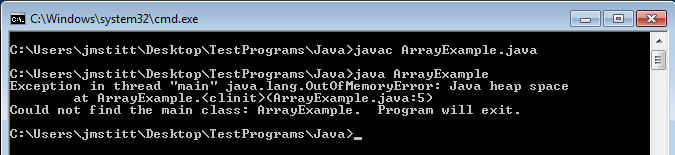
This section is creating and instantiating the int variable "size" then allocating memory for two two-dimensional arrays that contain size2 elements.  Let's try adding another 1024 to the size variable and see what happens.

Click for full size

Now that's interesting.  The part we're interested in is:
java.lang.OutOfMemoryError: Java heap space at ArrayExample.

Apparently when allocating memory for the second array, we run into a problem, as there is not enough memory.  At first glance, this seems strange, as I have 8 gigabytes of ram in this machine, and even though Java can't use all of that because I'm running 32-bit Java, I did not think it would be a problem as the maximum memory still should not have come anywhere near this.

I suppose the question now is how much memory did the example attempt to use?  Just looking at the size of the arrays, and not taking into account overhead, the arrays come out to just over 73mb of space.  Considering 32-bit allows for ~4gb of space, this still seems odd that we ran into a problem.  In order to explain this, we have to focus on another word in the error message:

java.lang.OutOfMemoryError: Java heap space at ArrayExample.

What is the "heap space"?

According to JavaWorld:
The JVM's heap stores all objects created by an executing Java program.

What is the size of the heap?

By default, the size of the heap in Java 1.6 is 64mb.

Now we can see that we were, in fact, trying to use more memory than we had available.  I have a problem with this though. I want to use more memory than 64mb.  Why?  Honestly, because I can.

Is this even possible, or are we stuck with this limit?

Luckily for us, Java allows for us to bypass this limit at runtime. By executing the java command with the argument -Xmx and choosing a new maximum heap size, we can set a larger heap size for the program's use.

Example:

     java -Xmx128m ArrayExample


The number in the example is our desired maximum heap size.  The "m" after the number designates that we mean megabytes, you can also use "g" for gigabytes, etc.

Let's try it, using the same program as before:
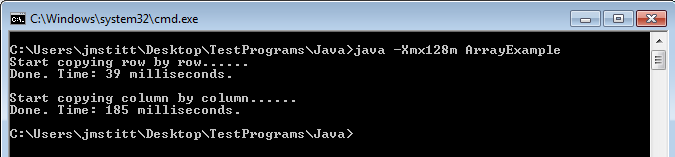
Click for full size

Ah, now it runs correctly, and we can run our test from yesterday with even larger numbers, allowing us to see the difference between the two array copying implementations more clearly.  You can go even larger than I did here.

Just as an example, here's a run with arrays containing 102402  (5x as many as yesterday's) elements:
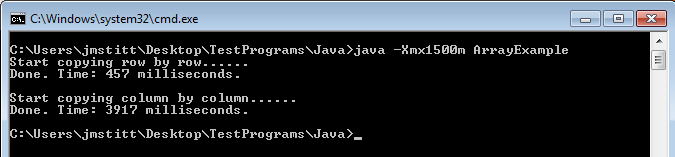
Click for full size

Now we're getting somewhere.

Another problem you may run into is trying to allocate more memory than you have physically in your machine, or just more than allowed.  Trying to set the maximum heap to 4g gives an error that it is an invalid maximum heap size.  Yet another error you may run into is the JVM not being able to find enough contiguous memory.  The heap only allows you to use memory that is in one big block, so just because you have two gigabytes unused on your machine doesn't mean you'll be able to use it (trust me, I tried).

Have some fun with it, see what you can do.  I'd love to hear what the maximum size people can get to work on their machines is.

C code still to come, and I'll try to have some other examples besides just this array copying scenario.

Here's some links to more information on the heap and other options:

Thursday, August 26, 2010

Code Complexity Classes: Math vs. Reality

Had an enjoyable first day of my computer science classes yesterday.  In my Computer Organization and Assembly Language class, the teacher went over some examples of different C code, then we'd look at the Assembly for the code to see what was really going on.  One example he showed used large arrays.

In the example, the scenario he gave was that students are given a large array, and they need to write code to copy the array to another array.  In this scenario, two students have very similar implementations, but with one key difference.

Note: I redid the code in Java so I could add a few tweaks, C and other languages to come later.

Code for the first student:
static void copyij(){
  for( int i = 0; i < size; i++){
   for( int j = 0; j < size; j++){
    B[i][j] = A[i][j];
   }
  }
 }
Code for the second student:
static void copyji(){
  for( int j = 0; j < size; j++){
   for( int i = 0; i < size; i++){
    B[i][j] = A[i][j];
   }
  }
 }
Just in case you missed it, or didn't feel like looking at the code, the difference is in the order they copied the elements of the array. Both students' code will compile and run without error. The first student copied all elements row by row, as opposed to the second student who went column by column.

Looking just at the complexity class of each piece of code, we see that both have a complexity of O(n2). Since this is often how we measure the efficiency of code, most people wouldn't look into it any further. The real world doesn't always work out so perfectly though. Running both segments of code and logging the time of each copy shows that the second student's code runs significantly slower than the first.

How much slower? Over 10 runs, the first student's code averaged 16ms, whereas the second student's code averaged 71ms. On my netbook, the difference was even more profound, with the first code being, on average, ~10 times faster than the second.


These times are in milliseconds though, and are so small as to be negligible. Without running benchmarks like this, you wouldn't even notice this in your program. What happens when your array has 10 times the amount of data as the one used here? Well, wait until tomorrow where we cover the same topic using C code and you can find out.

Edit: forgot to add the complete code so you can run it for yourself.  The complete code can be found here.  Happy coding!

Friday, August 13, 2010

In Memory of Matthew Shoemaker

Matthew Shoemaker
(1973 - 2010)

On Friday, July 30, Matthew Shoemaker passed away.  Matthew was a host and co-founder of one of my favorite podcasts, Infosec Daily.  Even though I never got the opportunity to meet him in person, I feel that through listening to the podcast each night, I did get to know him, and I will miss hearing his insight into the world of information security.

The ISD podcast has a page set up in memory of Matthew, which you can find here.  The page links as well to a paypal account for donations to the Matthew Shoemaker Memorial Fund, which has been set up to help provide for his two sons.  There is also a memorial episode of the podcast (episode 185), in which many friends of Matthew who had spoken on the podcast in the past gathered to reminisce and pay tribute to their friend.

A conference in his memory is also in the works. Called ShoeCon, it will be held September 18th in Atlanta.  Proceeds from the con will go to the Matthew Shoemaker Memorial Fund. More information can be found at the Infosec Daily website.

Please keep Matthew's family in your thoughts and prayers.