Monday night I participated in my first ever programming competition. It was an interesting experience which I thoroughly enjoyed. The competition was held in the Computer Science department, and was open to all students of the University.
The goal of the competition was to find people to go on to the regional competition, which will be either at Murray State University or at Louisiana State University (really want to say something here, but I'll refrain...). The reason for the two locations is that it would depend on what date the team decides to go.
In the competition we were given four problems to solve, and we were told we could access the official documentation for Java, C, and C++ (the three permitted languages), as well as make use of any printed materials we brought with us. Out of the four problems, I was only able to solve one during the competition. Towards the end I sort of stopped trying, since I knew I wouldn't get the others done in time, so I had a little fun with them and tried different things out.
Out of the eight people who competed, I came in sixth, which was fourth out of the people who are eligible to go on to regional. Since a team consists of three people, this leaves me as the first alternate, and I've been told by the coach (who is one of my teachers and a friend), James Church, that I'd go with the team to the competition whether or not I competed myself. I'm all for this.
Considering this was my first time doing a competition, I'm happy with my one correct answer, and with just not coming in last. One thing I learned during the course of the competition, and while looking at Church's solutions afterwards, is that I need to learn a lot more about the classes Java provides for me, as there were a few I didn't know about that would have allowed me to solve another problem or two very easily compared to how I was trying to do things.
This competition is another event that has inspired me to learn more about programming and to improve what I know by practicing. In my free time, I plan on attempting more problem solving exercises like those given in the competition.
Jeff Atwood (@CodingHorror on twitter) retweeted something this morning that was right along these lines. The post was from @enmerinc and said "How to become a better developer: 1) Go to #StackOverflow 2) Pick a question outside of your comfort zone 3) Open your IDE and solve it"
I really liked that idea, and plan on doing that from here on out. I don't know that I'll even average one problem a week, but even so, I'll learn something.
Showing posts with label coding. Show all posts
Showing posts with label coding. Show all posts
Thursday, September 30, 2010

Sunday, September 5, 2010
Code Complexity Classes II: Revisited
Here's that C code I've been promising:
Compiled in 64-bit Ubuntu 10.4.
When you run the code, just as in Java, you can see the difference in time between the "row by row" and "column by column" implementations:

The row by row implementation ran in 2.64 seconds according to the timer built into the program, with the column by column example running in 3.67 seconds.
This is in a VM, so comparisons to the Java example done before should not be made, as those examples were tested in the host OS. As always with things like this, the time is subject to your unique system and what is running at the time of execution.
What is important though, is to notice the difference in time between the two implementations, it is still there, and it is a noticeable amount, even with this relatively small amount of data.
Just for curiosity's sake, I decided to see how turning optimization flags on would affect the execution time:

With first level optimization, our row by row time dropped considerably to 2.32 seconds, and our column by column implementation time went up to 3.88 seconds, further increasing the gap.
With second level optimization, row by row dropped again to 2.27, and column by column further increased to 3.95. As you can see, this time the change was negligible.

With third level optimization, we saw a decrease about half that of first level optimization in the time for row by row copying to 2.16. This optimization also decreased the column by column time to below that of first level optimization, but higher than that of no optimization, putting it at 3.81 seconds.
I'm not going to go into what exactly these optimization flags do, as that's a topic for another post, and I'm not even sure what all is done myself at this point. I'm extremely new to C, so if you see anything incorrect in this post, feel free to point out my mistakes, and I'll be happy to correct them and give credit where credit is due.
Speaking of where credit is due, I must give some to my Assembly Language teacher, Dr. Chen, for providing the basic version of this code (I only added the timer and made some minor tweaks to suit my cosmetic style) and for providing the inspiration for these posts on complexity classes and how they stack up in the real world. Perhaps in the future I'll revisit this topic more in depth, for now though, I am done with it.
Compiled in 64-bit Ubuntu 10.4.
When you run the code, just as in Java, you can see the difference in time between the "row by row" and "column by column" implementations:

The row by row implementation ran in 2.64 seconds according to the timer built into the program, with the column by column example running in 3.67 seconds.
This is in a VM, so comparisons to the Java example done before should not be made, as those examples were tested in the host OS. As always with things like this, the time is subject to your unique system and what is running at the time of execution.
What is important though, is to notice the difference in time between the two implementations, it is still there, and it is a noticeable amount, even with this relatively small amount of data.
Just for curiosity's sake, I decided to see how turning optimization flags on would affect the execution time:
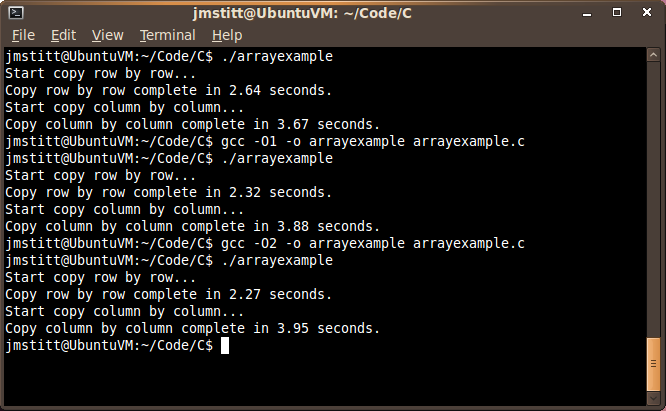
With first level optimization, our row by row time dropped considerably to 2.32 seconds, and our column by column implementation time went up to 3.88 seconds, further increasing the gap.
With second level optimization, row by row dropped again to 2.27, and column by column further increased to 3.95. As you can see, this time the change was negligible.

With third level optimization, we saw a decrease about half that of first level optimization in the time for row by row copying to 2.16. This optimization also decreased the column by column time to below that of first level optimization, but higher than that of no optimization, putting it at 3.81 seconds.
I'm not going to go into what exactly these optimization flags do, as that's a topic for another post, and I'm not even sure what all is done myself at this point. I'm extremely new to C, so if you see anything incorrect in this post, feel free to point out my mistakes, and I'll be happy to correct them and give credit where credit is due.
Speaking of where credit is due, I must give some to my Assembly Language teacher, Dr. Chen, for providing the basic version of this code (I only added the timer and made some minor tweaks to suit my cosmetic style) and for providing the inspiration for these posts on complexity classes and how they stack up in the real world. Perhaps in the future I'll revisit this topic more in depth, for now though, I am done with it.
Friday, August 27, 2010
The Java Heap
Note: Today's post is somewhat of a continuation of yesterday's. Just in case you didn't read yesterday's post, or would like to review, you can find it here.
What is the size of the heap?
By default, the size of the heap in Java 1.6 is 64mb.
Now we can see that we were, in fact, trying to use more memory than we had available. I have a problem with this though. I want to use more memory than 64mb. Why? Honestly, because I can.
Is this even possible, or are we stuck with this limit?
Luckily for us, Java allows for us to bypass this limit at runtime. By executing the java command with the argument -Xmx and choosing a new maximum heap size, we can set a larger heap size for the program's use.
Example:
java -Xmx128m ArrayExample
The number in the example is our desired maximum heap size. The "m" after the number designates that we mean megabytes, you can also use "g" for gigabytes, etc.
Let's try it, using the same program as before:


While writing the code for yesterday's blog post, I ran into a runtime error that I hadn't personally run into before, though it is by no means an uncommon error. The only reason I haven't run into it before is because I haven't before written programs in Java that had significant memory requirements.
Let's look at a section of code from yesterday:
static int size = 2048;

 static int A[][] = new int[size][size];
 static int B[][] = new int[size][size];
Find the complete code here
This section is creating and instantiating the int variable "size" then allocating memory for two two-dimensional arrays that contain size2 elements. Let's try adding another 1024 to the size variable and see what happens.

Click for full size
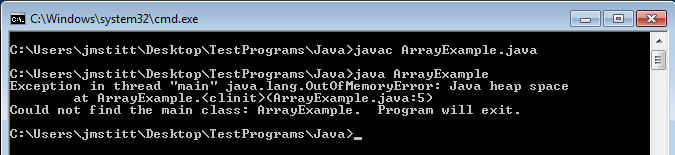
Now that's interesting. The part we're interested in is:
java.lang.OutOfMemoryError: Java heap space at ArrayExample.
Apparently when allocating memory for the second array, we run into a problem, as there is not enough memory. At first glance, this seems strange, as I have 8 gigabytes of ram in this machine, and even though Java can't use all of that because I'm running 32-bit Java, I did not think it would be a problem as the maximum memory still should not have come anywhere near this.
I suppose the question now is how much memory did the example attempt to use? Just looking at the size of the arrays, and not taking into account overhead, the arrays come out to just over 73mb of space. Considering 32-bit allows for ~4gb of space, this still seems odd that we ran into a problem. In order to explain this, we have to focus on another word in the error message:
java.lang.OutOfMemoryError: Java heap space at ArrayExample.
What is the "heap space"?
According to JavaWorld:
The JVM's heap stores all objects created by an executing Java program.
By default, the size of the heap in Java 1.6 is 64mb.
Now we can see that we were, in fact, trying to use more memory than we had available. I have a problem with this though. I want to use more memory than 64mb. Why? Honestly, because I can.
Is this even possible, or are we stuck with this limit?
Luckily for us, Java allows for us to bypass this limit at runtime. By executing the java command with the argument -Xmx and choosing a new maximum heap size, we can set a larger heap size for the program's use.
Example:
java -Xmx128m ArrayExample
The number in the example is our desired maximum heap size. The "m" after the number designates that we mean megabytes, you can also use "g" for gigabytes, etc.
Let's try it, using the same program as before:
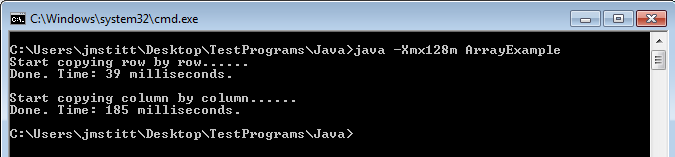
Click for full size
Ah, now it runs correctly, and we can run our test from yesterday with even larger numbers, allowing us to see the difference between the two array copying implementations more clearly. You can go even larger than I did here.
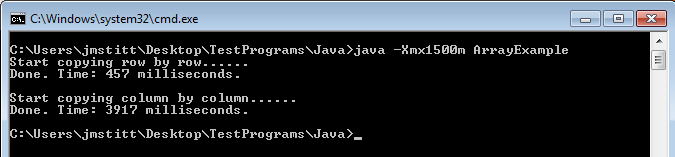
Just as an example, here's a run with arrays containing 102402 (5x as many as yesterday's) elements:
Click for full size
Now we're getting somewhere.
Another problem you may run into is trying to allocate more memory than you have physically in your machine, or just more than allowed. Trying to set the maximum heap to 4g gives an error that it is an invalid maximum heap size. Yet another error you may run into is the JVM not being able to find enough contiguous memory. The heap only allows you to use memory that is in one big block, so just because you have two gigabytes unused on your machine doesn't mean you'll be able to use it (trust me, I tried).
Have some fun with it, see what you can do. I'd love to hear what the maximum size people can get to work on their machines is.
C code still to come, and I'll try to have some other examples besides just this array copying scenario.
Here's some links to more information on the heap and other options:
Friday, August 6, 2010
Supercomputing and Some Updates
Supercomputing, Cluster Computing, and Grid Computing. These are all topics I have been interested in for quite some time, though I've never done any actual work on the topics, just some casual browsing for information and ogling pictures of different setups.
Lately I've had my interest in these topics rekindled, and now I actually have the knowledge and means to play around with all of them. Granted, I don't have the means ($$$) to play in these areas to the extent I would like to, but I can dabble nonetheless.
Over the next few weeks and months I'll be doing some small scale experiments with different High Performance Computing (HPC) models. Expect to see a few write-ups and updates here as I do this.
Now, onto some updates.
I've been taking classes for most of the summer, and when not in class, I've been enjoying my time off. Due to this, I've been extremely busy, and haven't had time to update this blog as much as I wanted to. I don't want to be one of those bloggers who apologizes constantly for not updating, so I'm not going to apologize. If you want me to update more often, bug me about it, otherwise, deal with it.
Another area I've been spending some time playing around in is different programming languages. Back in the day (I love sounding old), I dabbled in PHP in addition to writing HTML and CSS by hand. It's been a couple years, and lots of things have changed in all these areas. These past few weeks I've been doing some basic work in more languages than just Java (what my classes have been on during the past year). I believe I'm falling in love with programming in Scala, so expect me to post some tidbits (you'll see this word again in a minute!) on these different languages as I work my way through learning them.
In other news, my friend, Miranda, over at Tidbits for Your Wits (She changes this name way too often, so if the link breaks, sorry. She's promised not to change it again though.) has moved to an updating everyday system of posting. Not to be left in the dust, I'm going to be moving to a posting at least once a week system, as opposed to my current "post when I feel like it" system of blogging.
I've also added a new section to the sidebar, called "Currently Reading." This new feature is going to show to everyone (you guessed it) what I'm currently reading. I'll try to update it as soon as I move on to a new book (or books), but it is bound to fall behind from time to time. At the end of each book, I'll think about posting a review, if I feel like it.
That's about it, look forward to you all reading my stuff in the near future.
Subscribe to:
Posts (Atom)