Showing posts with label code. Show all posts

Thursday, September 16, 2010

Password Length and Complexity

I subscribe to quite a few mailing lists, for various topics and reasons.  One in particular that catches my attention more often than others is the Security Basics list.  This is one of several Security Focus lists that I subscribe to.  If you're looking for some lists, this is a good place to start.

One topic in particular that caught my eye today was a question titled simply: "Length vs Complexity."  Being a fan of looking at the complexity of things, I decided to see what this was all about.

Users hear constantly that they should add complexity to their passwords, but from the math of it doesn't length beat complexity (assuming they don't just choose a long word)? This is not to suggest they should not use special characters, but simply that something like Security.Basics.List would provide better security than D*3ft!7z. Is that correct?

Responses ranged from people asserting that increasing the length was better than increasing the keyspace (number of possible characters) to other people saying just the opposite.

The main criticism towards longer passwords that were easy to remember (multiple words, instead of random characters) was that it is still subject to dictionary attacks.  Granted, it is more difficult to pull off a dictionary attack when it isn't just one word, as you do have to try more possibilities, or possibly have some foreknowledge of the type of password used.  People saying this approach was not better were leaning towards saying that a true brute force approach would most likely not be the first thing tried.

Conversely, people saying that the "D*3ft!7z" example was weaker used the argument that it had fewer bits than a longer password with the same keyspace.

I fall in line with the first group.  The problem with using bit strength as your metric for password security is that saying a password has a certain amount of bit entropy means you're assuming that each character was randomly generated separate from the other characters.  Without making this assumption, you cannot say that a longer password always has more bits of entropy than a shorter one.  This is what entropy means.

A few months ago, I wrote a short script in Java to easily do the math on password bit strength.  The aforementioned problem is quickly evident when you run the program:


The program could be made more complex. Tests could be added checking to see if all possible types of characters for the given keyspace (numbers and letters; numbers, letters, and special characters; etc.) are actually used.  In most cases, this would give a more true value of entropy in the end.  Notice I said "in most cases," as this still would not completely solve the problem.

For example, say we have two passwords, "AAAA" and "AFIS" used by two members of Example.com.  Example.com only allows users to use capital letters in their passwords, disallowing numbers and special characters.  Now, a dictionary attack on these passwords may return no results, but when brute forcing the passwords, it is plainly evident that AAAA is going to be found much faster than AFIS.

Both passwords technically have the same amount of bits, and both passwords technically used all the character types available, but because AFIS was generated randomly, it has more entropy than AAAA.

Testing for randomness is quite a bit more difficult, and I'm not entirely sure you can completely say something is truly random.  Though, by doing the best we can, we will, without a doubt, have much stronger passwords.

Nowadays, with the use of GPU's for password cracking, Rainbow Tables, massive botnets, and other forms of computation available to those who would seek to crack people's passwords, it is nearly impossible to say a password really is "secure."  All we can hope is that it is "secure enough."  The password system is inherently broken, but it will be a long time coming, if it ever does, before we see another system completely replace it that does not suffer from it's own shortcomings.

You can find the thread from the mailing list here.

Sunday, September 5, 2010

Code Complexity Classes II: Revisited

Here's that C code I've been promising:


Compiled in 64-bit Ubuntu 10.4.

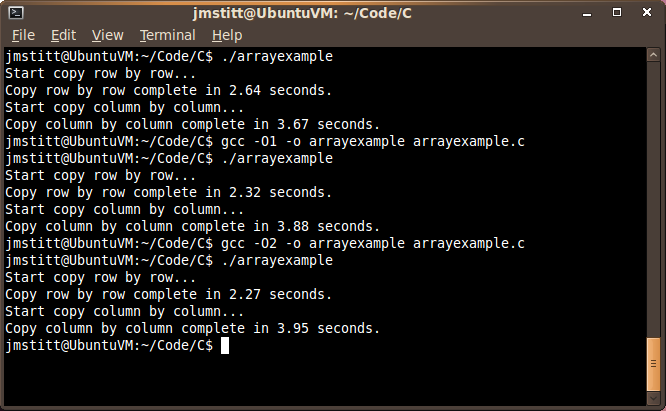
When you run the code, just as in Java, you can see the difference in time between the "row by row" and "column by column" implementations:

Photobucket

The row by row implementation ran in 2.64 seconds according to the timer built into the program, with the column by column example running in 3.67 seconds.

This is in a VM, so comparisons to the Java example done before should not be made, as those examples were tested in the host OS.  As always with things like this, the time is subject to your unique system and what is running at the time of execution.

What is important though, is to notice the difference in time between the two implementations, it is still there, and it is a noticeable amount, even with this relatively small amount of data.

Just for curiosity's sake, I decided to see how turning optimization flags on would affect the execution time:


With first level optimization, our row by row time dropped considerably to 2.32 seconds, and our column by column implementation time went up to 3.88 seconds, further increasing the gap.

With second level optimization, row by row dropped again to 2.27, and column by column further increased to 3.95. As you can see, this time the change was negligible.

Photobucket


With third level optimization, we saw a decrease about half that of first level optimization in the time for row by row copying to 2.16. This optimization also decreased the column by column time to below that of first level optimization, but higher than that of no optimization, putting it at 3.81 seconds.

I'm not going to go into what exactly these optimization flags do, as that's a topic for another post, and I'm not even sure what all is done myself at this point. I'm extremely new to C, so if you see anything incorrect in this post, feel free to point out my mistakes, and I'll be happy to correct them and give credit where credit is due.

Speaking of where credit is due, I must give some to my Assembly Language teacher, Dr. Chen, for providing the basic version of this code (I only added the timer and made some minor tweaks to suit my cosmetic style) and for providing the inspiration for these posts on complexity classes and how they stack up in the real world.  Perhaps in the future I'll revisit this topic more in depth, for now though, I am done with it.

Friday, August 27, 2010

The Java Heap

Note: Today's post is somewhat of a continuation of yesterday's. Just in case you didn't read yesterday's post, or would like to review, you can find it here.

While writing the code for yesterday's blog post, I ran into a runtime error that I hadn't personally run into before, though it is by no means an uncommon error.  The only reason I haven't run into it before is because I haven't before written programs in Java that had significant memory requirements.

Let's look at a section of code from yesterday:
static int size = 2048;
 
 static int A[][] = new int[size][size];
 static int B[][] = new int[size][size];
Find the complete code here

This section is creating and instantiating the int variable "size" then allocating memory for two two-dimensional arrays that contain size2 elements.  Let's try adding another 1024 to the size variable and see what happens.

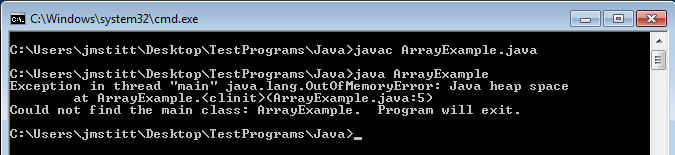
Click for full size

Now that's interesting.  The part we're interested in is:
java.lang.OutOfMemoryError: Java heap space at ArrayExample.

Apparently when allocating memory for the second array, we run into a problem, as there is not enough memory.  At first glance, this seems strange, as I have 8 gigabytes of ram in this machine, and even though Java can't use all of that because I'm running 32-bit Java, I did not think it would be a problem as the maximum memory still should not have come anywhere near this.

I suppose the question now is how much memory did the example attempt to use?  Just looking at the size of the arrays, and not taking into account overhead, the arrays come out to just over 73mb of space.  Considering 32-bit allows for ~4gb of space, this still seems odd that we ran into a problem.  In order to explain this, we have to focus on another word in the error message:

java.lang.OutOfMemoryError: Java heap space at ArrayExample.

What is the "heap space"?

According to JavaWorld:
The JVM's heap stores all objects created by an executing Java program.

What is the size of the heap?

By default, the size of the heap in Java 1.6 is 64mb.

Now we can see that we were, in fact, trying to use more memory than we had available.  I have a problem with this though. I want to use more memory than 64mb.  Why?  Honestly, because I can.

Is this even possible, or are we stuck with this limit?

Luckily for us, Java allows for us to bypass this limit at runtime. By executing the java command with the argument -Xmx and choosing a new maximum heap size, we can set a larger heap size for the program's use.

Example:

     java -Xmx128m ArrayExample


The number in the example is our desired maximum heap size.  The "m" after the number designates that we mean megabytes, you can also use "g" for gigabytes, etc.

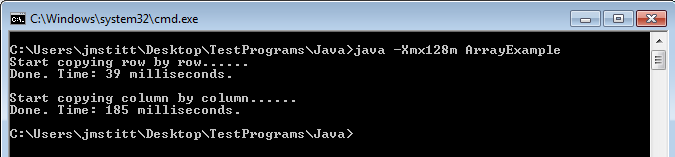
Let's try it, using the same program as before:

Click for full size

Ah, now it runs correctly, and we can run our test from yesterday with even larger numbers, allowing us to see the difference between the two array copying implementations more clearly.  You can go even larger than I did here.

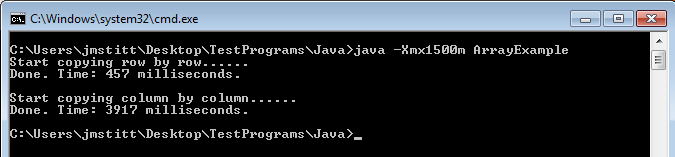
Just as an example, here's a run with arrays containing 102402  (5x as many as yesterday's) elements:

Click for full size

Now we're getting somewhere.

Another problem you may run into is trying to allocate more memory than you have physically in your machine, or just more than allowed.  Trying to set the maximum heap to 4g gives an error that it is an invalid maximum heap size.  Yet another error you may run into is the JVM not being able to find enough contiguous memory.  The heap only allows you to use memory that is in one big block, so just because you have two gigabytes unused on your machine doesn't mean you'll be able to use it (trust me, I tried).

Have some fun with it, see what you can do.  I'd love to hear what the maximum size people can get to work on their machines is.

C code still to come, and I'll try to have some other examples besides just this array copying scenario.

Here's some links to more information on the heap and other options:

Saturday, February 13, 2010

Prime Numbers

Recently I've become fascinated with prime numbers.  I believe it started when I was reading an article on how researchers recently cracked 768-bit RSA encryption.  The past few months have seen me becoming more and more interested in different fields of mathematics, and this is just the latest one to have popped up for me.

For people who don't know, a prime number is a number that is only divisible by one and itself, and one is not seen as a prime number, though it was considered one in the past.  A step further takes you to superprimes, which are prime numbers which have a position in the list of prime numbers that is also a prime number.

Why is this interesting to me?  Honestly, I'm not really sure, but I've been checking books out at the library on number theory and how prime numbers have been found historically among other similar topics.  I don't have a readily applicable use for this knowledge in my own life, but just for kicks I've been using it to write a program that goes through numbers and determines their primality.

I have a very basic version working currently, and my goal is to optimize it as time goes on and I learn more about optimizations that can be made.  Eventually I plan to have it run on multi-core systems, and also determine if numbers are superprimes.  Code for the basic test program will be added to the "Code Corner" page, and this will also be added to my "Projects" page, since I plan to work on this for a while.